What Does an SEO Agency Actually Do?

Real Estate SEO That Generates Seller Leads (The Half of the Strategy Nobody’s Writing About)
The SEO Audit Checklist Every Small Business Owner Needs in 2026 (Before You Spend Another Dollar on SEO)
Quick answer: An SEO audit is a systematic review of everything stopping your website from ranking higher on Google. For small businesses, the five areas that matter most are: technical health, on-page optimisation, content quality, local presence, and backlink profile. This checklist covers all five in the order that produces results fastest.
Most small businesses don’t have an SEO problem. They have a foundation problem dressed up as an SEO problem.
They publish blog posts on a website that Google can barely crawl. They build backlinks to pages that have duplicate title tags. They invest in local SEO while their Google Business Profile points to the wrong address. The effort is real. The results don’t follow because the foundation underneath the effort is broken.
An SEO audit finds the foundation problems. It stops you from building on top of a crack.
This checklist covers everything a professional SEO audit should surface for a small business in 2026, in the order you should fix it, based on what moves rankings fastest. Work through it before you hire an agency, before you commission another piece of content, and before you spend another dollar on a strategy that will underperform until the basics are right.
Why most small businesses skip the audit (and why that's expensive)
Because it feels like delay.
You want rankings. You want traffic. You want leads. An audit sounds like homework before the real work starts, and when budgets are tight, homework feels like a luxury.
Here’s what the skip actually costs: every piece of content you publish on a technically broken site either fails to rank or ranks for the wrong terms. Every backlink you earn to a page with a duplicate meta description loses a fraction of its potential value. Every local SEO tactic you execute while your NAP citations are inconsistent gets partially cancelled out.
The audit doesn’t slow down your SEO. It’s the thing that makes everything else work properly.
Section 1: Technical health (fix these first, nothing else matters until you do)
Technical SEO is the infrastructure your rankings are built on. Fix technical problems before content and links, because content and links on a broken foundation consistently underperform.
Check 1: Is Google actually indexing your site?
Go to Google Search Console → Coverage report. Look for pages with errors or “excluded” status. Then type site:yourdomain.com into Google and count the results.
If Google is indexing significantly fewer pages than you have live, you have an indexing problem that will suppress every other SEO effort until it’s fixed.
✅ Pass: All important pages show as indexed. Excluded pages are intentionally excluded (thank-you pages, admin pages).
❌ Fail: Service pages, blog posts, or product pages showing as “Discovered, not indexed” or “Crawled, not indexed.”
Check 2: Is your robots.txt file blocking anything it shouldn’t?
Go to yourdomain.com/robots.txt. Read the Disallow lines. If any of them are blocking your service pages, blog, or homepage, that’s a critical error that will prevent ranking regardless of everything else you do.
✅ Pass: robots.txt is clean and only blocks genuinely private pages. ❌ Fail: Any service page or blog directory is listed under Disallow.
Check 3: Does your site pass Core Web Vitals?
Go to PageSpeed Insights and test your homepage and your most important service page on mobile. Look at the three Core Web Vitals scores:
- LCP (Largest Contentful Paint): Should be under 2.5 seconds
- CLS (Cumulative Layout Shift): Should be under 0.1
- INP (Interaction to Next Paint): Should be under 200ms
Google confirmed in 2024 that INP replaced FID as the responsiveness metric; any agency not tracking INP is behind.
✅ Pass: All three metrics show green on mobile.
❌ Fail: Any red or amber on mobile Core Web Vitals.
Check 4: Is your site mobile-friendly?
Use Google’s Mobile-Friendly Test. More than 60% of all searches happen on mobile. A site that fails this test has a direct ranking disadvantage.
✅ Pass: “Page is mobile friendly.”
❌ Fail: Any usability issues flagged.
Check 5: Do you have broken links (404 errors)?
Use Screaming Frog (free up to 500 URLs) or the Coverage report in Search Console. Internal links pointing to 404 pages bleed crawl budget and authority from pages that need it.
✅ Pass: Zero or near-zero 404 errors on internal links.
❌ Fail: Multiple internal links returning 404 status.
Check 6: Is HTTPS configured correctly?
Visit your homepage over HTTP (http://yourdomain.com). It should automatically redirect to HTTPS. Check that the padlock appears in your browser. HTTP sites receive an explicit ranking disadvantage from Google.
✅ Pass: HTTP redirects to HTTPS. Valid SSL certificate active.
❌ Fail: No redirect. Mixed content warnings. Expired certificate.
Section 2: On-page optimisation (the signals that tell Google what each page is about)
Once your technical foundation passes, the next layer is on-page signals, the elements on each page that tell Google exactly what that page is about, who it’s for, and why it should rank for a specific search.
Check 7: Does every important page have a unique, keyword-optimised title tag?
In Google Search Console, go to Performance → Pages. Click your most important pages and check whether the title tag appearing in search results includes the primary keyword you’re targeting for that page.
Common failure: multiple pages share the same title tag, or title tags describe the business name rather than the service being offered.
✅ Pass: Each page has a unique title tag that includes the target keyword in the first 60 characters.
❌ Fail: Duplicate title tags, missing title tags, or title tags that don’t include the target keyword.
Check 8: Does every page have a unique meta description?
Meta descriptions don’t directly affect rankings, but they affect click-through rate, which does. A well-written meta description that includes the search term and a clear reason to click increases your traffic even at the same ranking position.
✅ Pass: Every indexed page has a unique meta description under 155 characters.
❌ Fail: Missing, duplicate, or auto-generated meta descriptions.
Check 9: Does each page have a clear H1 that matches search intent?
Your H1 is the primary signal to both Google and the reader about what a page covers. It should match the language your target customer uses, not the internal language of your business.
A plumber’s service page H1 that says “Our Plumbing Solutions” is weaker than one that says “Emergency Plumber in [City], Available 24/7.”
✅ Pass: One H1 per page. Includes the primary keyword. Written for the search query, not the brand.
❌ Fail: Missing H1, multiple H1s, or H1 that doesn’t match the target keyword.
Check 10: Are your URLs clean and keyword-inclusive?
yoursite.com/services/local-seo-services/ outperforms yoursite.com/page?id=47 on every ranking factor.
✅ Pass: URLs are short, lowercase, hyphenated, and include the primary keyword.
❌ Fail: Dynamic URLs with parameters. Long, unmemorable strings. Missing keywords.
Check 11: Do your pages have internal links with intent-matched anchor text?
Internal links pass authority between pages and help Google understand your site structure. The anchor text, the clickable words in the link, should describe what the destination page is about.
“Click here” tells Google nothing. “Local SEO services for small businesses” tells Google exactly what the destination page covers.
✅ Pass: Key pages receive internal links from relevant supporting content. Anchor text describes the target page’s topic.
❌ Fail: Service pages receive few or no internal links. Anchor text is generic (“click here,” “read more,” “this page”).
Section 3: Content quality (the gap most small businesses don't know they have)
Check 12: Does your most important content answer the full question, or just part of it?
Google’s Helpful Content system evaluates whether a page genuinely satisfies the search query it’s targeting, or whether it’s thin content that mentions a keyword without providing real value.
For each of your key service pages or blog posts, ask: if someone searching for this topic landed on this page, would they get everything they came for? Or would they still need to open three other tabs?
✅ Pass: Pages cover the topic comprehensively. FAQ sections present. Internal links to related content. Word count appropriate for topic complexity (service pages 600–1,000 words, informational posts 1,500–2,500 words).
❌ Fail: Service pages under 300 words. Blog posts that mention a keyword but don’t answer the underlying question. No FAQ section on service pages.
Check 13: Do you have topic clusters, or isolated pages?
A pillar page on “Local SEO” supported by blog posts covering “how to optimise your Google Business Profile,” “why NAP consistency matters,” and “how to get into the Google 3-Pack” tells Google you’re a genuine expert on local SEO. Three isolated pages that each mention “local SEO” without connecting to each other don’t build the same authority.
✅ Pass: Your most important service areas have supporting blog content that links back to the main service page.
❌ Fail: Blog posts exist independently with no connection to service pages. Or no blog content exists at all.
Check 14: When was your content last updated?
Google’s freshness signals favour content that’s been recently reviewed and updated, especially in fast-moving industries. A blog post from 2021 that hasn’t been touched is slowly losing its ranking value compared to a competitor who refreshes theirs annually.
✅ Pass: Key pages and posts reviewed and updated within the last 12 months. Published/updated date visible on posts.
❌ Fail: Core service pages haven’t been updated in 2+ years. Blog posts reference outdated statistics or practices.
Section 4: Local presence (critical for any business with a geographic service area)
Check 15: Is your Google Business Profile claimed, verified, and complete?
Go to your GBP dashboard. Check:
- Verified status (green checkmark)
- Is the business category the most specific, accurate category available?
- Service area or physical address, does it match what’s on your website exactly?
- Business description: does it include your primary keywords naturally?
- Photos: at least 10, updated within the last 6 months
- Posts: at least one published in the last 30 days
✅ Pass: Verified. Complete. Category accurate. Description keyword-rich. Active with recent posts and photos.
❌ Fail: Unverified. Missing hours or services. No photos. Description generic or empty.
Check 16: Is your NAP consistent across the web?
NAP stands for Name, Address, Phone number. It needs to be identical across your website, Google Business Profile, Yelp, Facebook, local directories, and any other platform your business appears on.
Even small differences, “Street” vs “St.” or a phone number with different formatting, create inconsistency signals that suppress local rankings. Google reads consistency as a trust signal. Inconsistency creates doubt.
Run your business name through a citation checker (BrightLocal or Moz Local offer free checks) and look for mismatches.
✅ Pass: NAP identical across all major directories and platforms.
❌ Fail: Multiple variations of your business name, address format, or phone number across platforms.
Check 17: Do you have a review strategy, and are you responding to reviews?
Review volume, recency, and response rate are all local ranking factors. A business with 8 reviews from 2022 is ranked below a competitor with 40 reviews from the last six months, all else being equal.
✅ Pass: Consistent stream of recent reviews. Responding to all reviews (positive and negative) within 48 hours.
❌ Fail: No reviews in the last 6 months. Negative reviews unanswered. No process for requesting reviews from happy clients.
Section 5: Backlink profile (the authority your site has earned)
Check 18: How many referring domains does your site have?
Go to the free version of Ahrefs (ahrefs.com/website-checker) or Ubersuggest and enter your domain. Look at the referring domains count and the unique websites linking to you.
There’s no universal target number, but compare it to your top 3 competitors for your primary keyword. If they have 80 referring domains and you have 12, link building needs to be a priority in your SEO strategy.
✅ Pass: Referring domain count is growing and competitive with top-ranking pages for your primary keywords.
❌ Fail: Fewer than 5–10 referring domains for a site older than 12 months. No growth in referring domains over the past 6 months.
Check 19: Are your backlinks from relevant, reputable sources?
Not all backlinks are equal. Links from sites with high domain authority (DA 40+) that are relevant to your industry carry genuine weight. Links from random, unrelated directories or spammy networks can hurt.
✅ Pass: Majority of backlinks from relevant industry sources, local publications, or authoritative directories.
❌ Fail: High proportion of backlinks from unrelated sites, link farms, or foreign-language domains with no relevance to your business.
Your audit scorecard
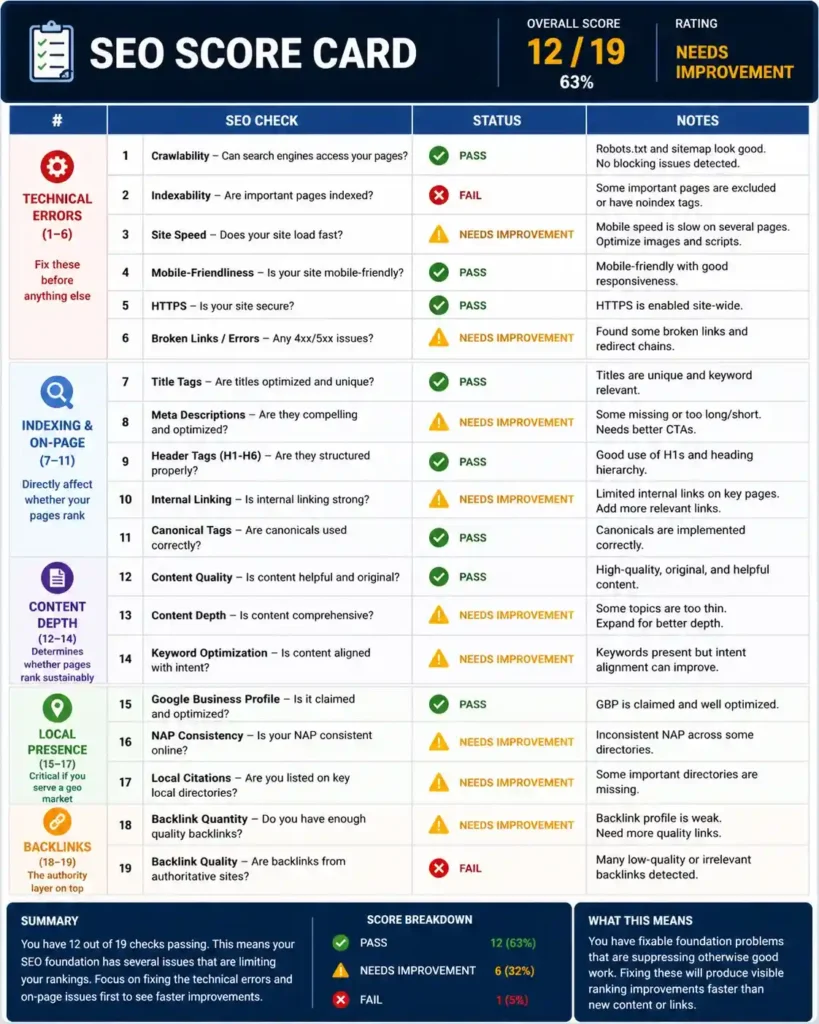
👇 Click each check to mark it as Pass (✅), Needs improvement (⚠️), or Fail (❌). Your score updates automatically.
0
Pass
0
Needs Improvement
0
Fail
0%
Score
What to do with your audit results
Two paths:
Path 1 Fix it yourself: Work through the priority order above. Most technical and on-page fixes are implementable without an agency if you have WordPress access and a free Google Search Console account. The Google Search Console Help Centre and web.dev are both excellent free resources.
Path 2 Use the audit as your agency brief: If you’re evaluating an SEO agency or holding your current one accountable, share your audit results and ask them to walk you through specifically how they’d address each failing check, in what order, by when, and what you should expect to see in your data when each fix is live.
An agency that can give you a specific, prioritised answer to that question is an agency worth trusting with your budget.
Frequently asked questions
What is an SEO audit for a small business? An SEO audit is a systematic review of your website’s technical health, on-page optimisation, content quality, local presence, and backlink profile to identify what’s blocking your rankings and what to prioritise. For small businesses, audits typically surface 5–10 fixable issues that, once resolved, produce visible ranking improvements within 60–90 days.
How often should I audit my website for SEO? A full audit should be completed before any new SEO engagement and then every 6–12 months. Partial audits, checking technical health, indexing, and Core Web Vitals, should ideally happen monthly. Google’s algorithm updates can create new issues even on previously healthy sites.
Can I do an SEO audit myself without tools? Yes, for most of the checks in this list. Google Search Console (free), PageSpeed Insights (free), and Google’s Mobile-Friendly Test (free) cover the majority of what matters most. Paid tools like Ahrefs or Screaming Frog give more depth but aren’t required for a first-pass audit.
What’s the most common SEO problem small businesses have? Based on the audits we run, the most consistently present problems are: pages not properly indexed in Google Search Console, no clear keyword targeting on service pages, NAP inconsistency for local businesses, and zero or outdated content supporting main service pages. All four are fixable without significant technical expertise.
How long does it take to see results after fixing audit issues? Technical fixes, once confirmed in Search Console, typically produce ranking changes within 2–4 weeks. On-page optimisations show movement within 4–8 weeks. Content improvements and link building effects compound over 3–6 months.
Want someone to run this audit for you?
If you’d rather have a professional tell you exactly which of these 19 checks your site is failing, and what fixing each one is worth to your rankings, we offer a free SEO analysis that covers all of this and produces a clear priority list.
No obligation. No pitch. Just a straight answer about where your site stands.
Written by Dua | SEO Specialist, Search by Dua | searchbydua.com

Related posts